Updating .rsp and .rsq File Timestamps
There are several methods that can be used for updating the timestamp of an .rsp or .rsq file.
- File Save — download the .rsp file from the BSS, open it using a text editor then save and close the file. Upload the updated file to the BSS.
- CygNet Explorer — right-click on the file in the BSS and select Update File Time. This will update the timestamp to the current date/time on your computer.
- BSS Explorer — select the file in the BSS Explorer and the Update File Time icon. Click Yes to confirm the update. This will update the Modified Date timestamp to the current date/time on your computer.
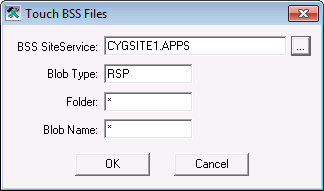
- TouchBSS.exe — this utility resides on the host server and provides a mechanism to update multiple timestamps in a BSS by allowing * wildcards to select all files of a specified type, in this case all .rsp files in the CYGDEMO APPS.
|
Touch BSS Files |